
How it works?
Every action you take—feeding, grooming, playing, or supporting rescues—helps you earn coins and unlock exciting rewards.
Watch how you can rescue cats, care for virtual pets, and earn rewards in the app



How It Works for Rescues & Shelters
STEP 1 —
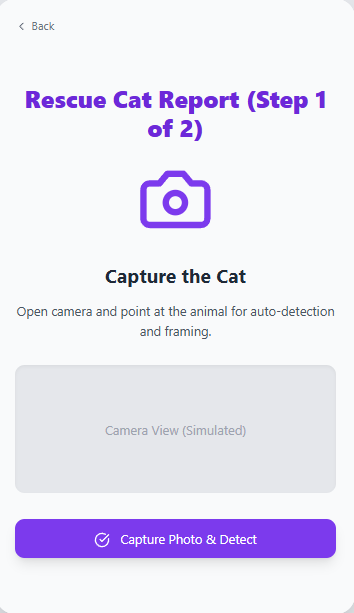
Rescue • Upload
- Upload photo/video of cat
- Add basic details (location, condition)
- The profile gets posted for game players to see
- User earns Rescue Points / Coins


STEP 2 —
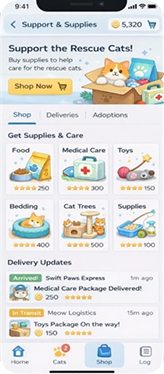
Support & Supplies
- Users spend game coins on food, treats, medical care, and supplies
- Report when package arrives to rescue and update the player
- Adopt out cats to qualified applicants
STEP 3 —
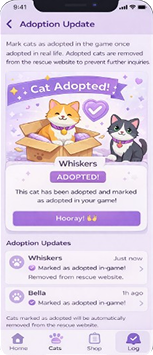
Adoption Update
- Mark cats as adopted in the game once adopted in real life
- Adopted cats are removed from the rescue website
How It Works for Game Users
STEP 1 —
Choose • Play • Customize
- Virtually adopt a rescue cat as a playable character
- Up to 10 cats can be active at a time
- Customize your avatar
STEP 2 —
Parent • Care • Earn
- Play the game and care for your avatar cat
- Complete daily tasks
- Maintain health, hunger, and mood
- Earn coins, points, achievements, and badges
STEP 3 —
Shop • Save • Support
- Use coins or points to support real rescue cats with food, medical care, supplies, bedding, and enrichment
- Redeem points for gift cards
- Make optional donations using game coins or real money
- In-game purchases improve gameplay and support real cats
- Shopping for real items helps fund rescues
- Receive updates when donated items are delivered
STEP 4 —
Adopted in Real Life
- When a rescue cat is adopted, the avatar is retired
- Choose another rescue cat as your new character
- All virtual items remain in storage and can be reused
Download App now
Everything for Cats,In One App
Rescue, adopt, donate, shop, and care—all from your phone.

